Coding agents know where a favicon goes, not what it should look like
Ask a coding agent for a favicon and you get one in about thirty seconds. It reads your logo, renders a few sizes, drops the files where your framework expects them and tells you it's done. It's fast, it's free, and it usually looks fine.
But is it the same favicon every time? If two developers on the same team make the same request in the same project, do they get the same result? If you ask again tomorrow, do you get what you got today?
I wanted to know, so I asked Claude Code the same thing twelve times.
The experiment
The project. A brand-new Next.js app, created with
npx create-next-app@latest --yes: Next.js 16.3.8, App Router, src/app/, the
default favicon.ico and everything create-next-app generates, including its
AGENTS.md. Dependencies are installed, so the app builds. I added one file
at the root, logo.svg:
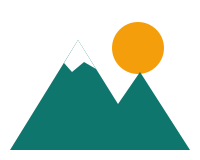
This logo is a typical one, with two features that make it a fair test:
- It's not square (200×160). Something has to decide how to fit it into square icons.
- It has a white snowcap on a transparent background. On a white background, that part of the logo disappears.
The request. Every run received exactly the same message, and nothing else:
generate a favicon for my project, use the logo at logo.svg
The tool. Claude Code 2.1.289 with its default model, Claude Opus 5.5, on
October 4, 2026. Each run was a separate headless session (claude -p) in
its own fresh copy of the project, at a random path. No user settings, no
memory, no plugins, no MCP servers, nothing that could hint the session was
being tested. Claude Code could edit files, run shell commands, read files
and browse the web without asking.
What I kept. For each run: the full transcript, every file it changed or created, the time, the cost, and its final answer.
I ran it twelve times.
What stays the same
To be fair, a lot doesn't change. In all twelve runs, Claude Code:
- Read the Next.js docs shipped in
node_modules, asAGENTS.mdasks. - Produced the same three files in the same place: a new
src/app/favicon.icoreplacing the default one, a newsrc/app/icon.svgand a newsrc/app/apple-icon.png(180×180, opaque background). - Relied on Next.js file conventions and left
layout.tsxuntouched. - Made the logo square by adding space rather than stretching it.
- Looked at at least one rendered image before finishing.
- Didn't commit anything.
The plan, in other words, is stable. Claude Code has a clear idea of what a favicon for a Next.js app is (an ICO, an SVG and an Apple touch icon) and it picks it every time. It never added a web app manifest, Android icons, a dark-mode variant or a simplified version for small sizes.
Stable here, though, doesn't mean stable everywhere. This is one project, one logo and one sentence, run twelve times. Nothing guarantees the same three files with another framework, another logo, a slightly different request or the next model update. In earlier tests, asking for favicons "for all platforms" instead was enough to add a web app manifest and Android icons. The package is consistent in this experiment. It isn't a specification.
Everything below the plan, though, changes from one run to the next.
Eleven different packages
Out of twelve runs, I got eleven different favicon packages. Only runs 2 and 5 produced byte-identical files, because they happened to type exactly the same commands.
At first glance, the Apple touch icons look alike:
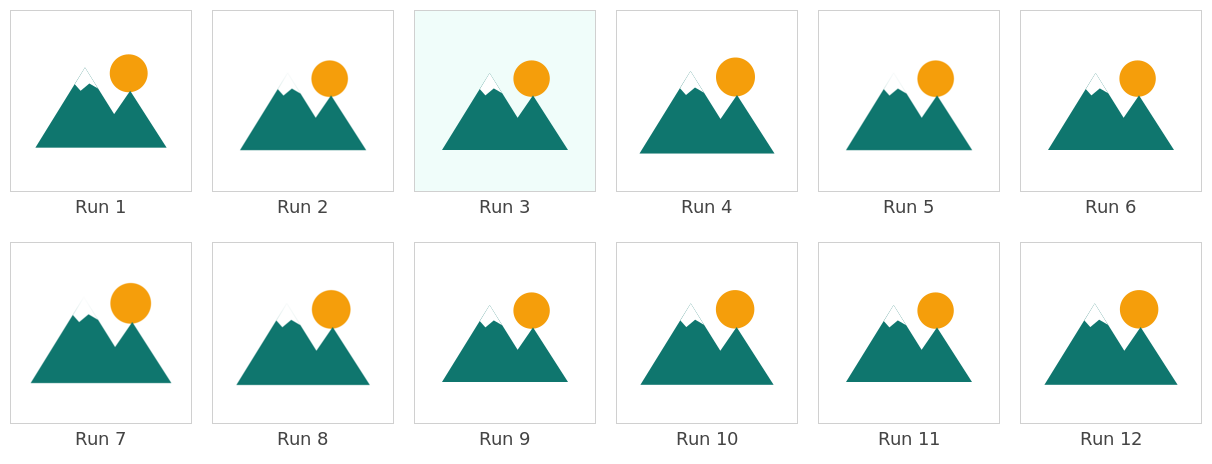
Look closer, and they're not.
Three different image pipelines
Claude Code has to turn an SVG into PNG and ICO files, and how it does that is improvised in every run, from whatever it finds on the machine:
| Pipeline | Runs |
|---|---|
| ImageMagick only | 2, 5, 7, 8 |
sharp (found in node_modules) + ImageMagick | 1, 3, 4, 6, 9, 10, 11 |
sharp + an ICO encoder written on the spot in JS | 12 |
Even within a pipeline, the settings vary. The SVG was rasterized at 300, 384, 600 or 1,200 DPI depending on the run. Run 7 rendered a 256×256 image first and downscaled from it, while the others rendered each size directly.
The small sizes don't look the same
At 32×32, the size that ends up in a browser tab, the differences are visible:
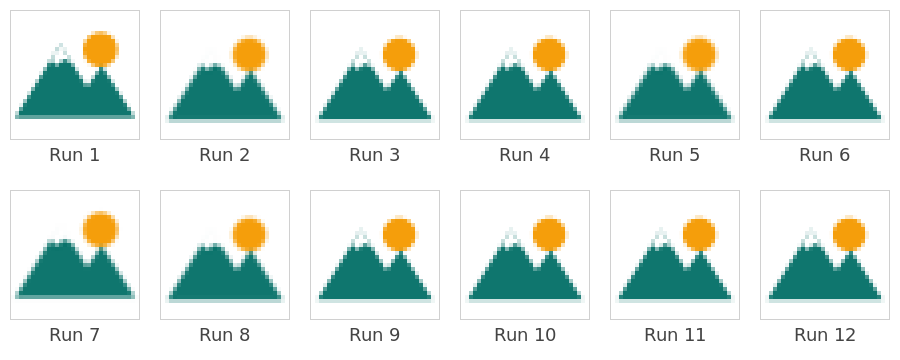
The ImageMagick runs (2, 5, 7 and 8) are softer, and the mountain edges
blur into the background. The sharp runs are crisper. Depending on the run,
the snowcap is a few distinct pixels or a faint smudge.
The ICO file isn't the same file
The favicon.ico came in eight different versions:
- Sizes: 16, 32 and 48 pixels in eleven runs. Run 10 also added a 256×256 image.
- Order: smallest first in eight runs, largest first in the four ImageMagick runs.
- Encoding: BMP images inside the ICO in eleven runs, PNG images in run 12, the one that wrote its own encoder.
- Weight: from 2 KB (run 12) to 21.7 KB (run 10), against 15.1 KB for most runs.
Two ways to make the logo square
All runs made the logo square by editing the SVG viewBox instead of
redrawing it. But they didn't all frame it the same way:
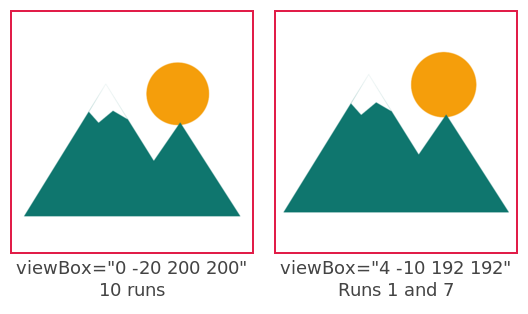
Ten runs kept the logo's full width and added 20 units above and below. Runs 1 and 7 picked a tighter, 192-unit square, so the logo is slightly larger and almost touches the edges.
The Apple touch icon: size, background, file
On the 180×180 Apple touch icon, every run had to choose how much padding to add and what color to put behind the logo. All twelve made it opaque, since iOS fills transparent areas with black.
- Padding: the logo was fitted into a 140, 148 or 150 pixel box, depending on the run. In the final images, the logo is between 126 and 142 pixels wide, 70% to 79% of the icon.
- Background: white in eleven runs, pale teal (
#f0fdfa) in run 3. - File: 8-bit PNG in nine runs, 16-bit PNG in three (runs 2, 5 and 7), for sizes from 2.7 KB to 9.8 KB. A 3.6× difference for the same 180×180 icon.
The flaw in the logo: noticed once in twelve
The white snowcap is the trap of this test. On a white background, it disappears: the mountain loses its peak.
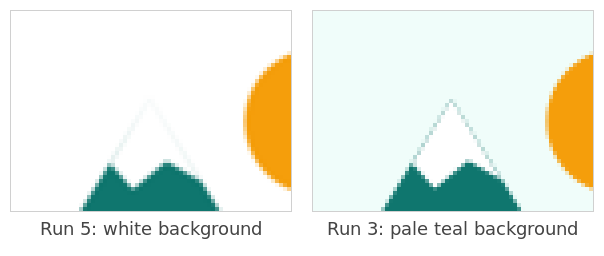
All twelve runs looked at their rendered icons. Here's what they did about it:
| What happened | Runs |
|---|---|
| Noticed the problem and fixed it (pale teal background) | 3 |
| Noticed the problem and offered to fix it | 6, 9 |
| Noticed the problem and decided to leave it | 4 |
| Noted the snowcap is barely visible at 16 pixels, and moved on | 1, 8, 10 |
| Didn't mention it | 2, 5, 7, 11, 12 |
One run in twelve shipped an icon where the logo is complete. Five runs never mentioned it, so the developer would have no reason to look.
The checks: build or no build
Before reporting back, some runs checked their work more thoroughly than others:
- 5 runs (1, 3, 10, 11, 12) ran a production build to make sure Next.js
picked up the icons. Run 10 also started the app and checked the
<link>tags in the served HTML. - 7 runs only looked at rendered images.
This is the main reason why the time varied from 20 to 52 seconds and the number of turns from 6 to 11. The cost went from $0.13 to $0.20 per run.
What the developer is told
The final answers share a structure: what was done, the three files, why
layout.tsx didn't change, a note that nothing is committed. But they're not
the same message. They run from 133 to 185 words, some use a list and others a
table, and they don't report the same things:
- Five say the build passes. Seven say they didn't run the app.
- Seven mention the snowcap, with four different conclusions (see above).
- Some explain why the Apple icon has a background, some don't.
- Run 3 tells the developer it changed the background color to save the snowcap. Run 5, whose snowcap vanished, says "the mountains-and-sun logo looks right at small sizes".
Two developers who make the same request don't just get different files. They get different levels of verification, and a different account of what to watch for.
Summary of the twelve runs
| Run | Pipeline | ICO sizes | Apple icon background | Build checked | Snowcap | Time |
|---|---|---|---|---|---|---|
| 1 | sharp + ImageMagick | 16, 32, 48 | white | yes | noted | 42 s |
| 2 | ImageMagick | 48, 32, 16 | white | no | silent | 22 s |
| 3 | sharp + ImageMagick | 16, 32, 48 | pale teal | yes | fixed | 47 s |
| 4 | sharp + ImageMagick | 16, 32, 48 | white | no | left as is | 23 s |
| 5 | ImageMagick | 48, 32, 16 | white | no | silent | 20 s |
| 6 | sharp + ImageMagick | 16, 32, 48 | white | no | offered fix | 25 s |
| 7 | ImageMagick | 48, 32, 16 | white | no | silent | 25 s |
| 8 | ImageMagick | 48, 32, 16 | white | no | noted | 25 s |
| 9 | sharp + ImageMagick | 16, 32, 48 | white | no | offered fix | 26 s |
| 10 | sharp + ImageMagick | 16, 32, 48, 256 | white | yes + served | noted | 48 s |
| 11 | sharp + ImageMagick | 16, 32, 48 | white | yes | silent | 52 s |
| 12 | sharp + custom encoder | 16, 32, 48 | white | yes | silent | 51 s |
Why it matters
Different results from the same request are nothing new. That's how agents work: ask twice, get two slightly different implementations. Most of the time, nobody cares. If two runs style a footer differently, nobody notices, and the footer still works.
The favicon is not a footer. It's the part of your site people see most often without visiting it: in browser tabs, bookmarks and history, next to your link in Google results, and on the home screen of every phone that saves your site. It's a small copy of your brand, and it's shown in more places than your homepage. A favicon that's slightly off isn't a detail nobody notices. It's a detail everybody sees, every day.
That's the real problem: with an agent alone, you don't see the result.
- The browser tab is easy to check. Run the app locally and look at the tab. A few seconds, and you probably will.
- Google results are harder: your site must be deployed and indexed, and Google shows the icon on its own background. Since it's the same favicon as in the tab, you might reasonably skip this check.
- The Apple touch icon is almost certainly never checked. You'd have to deploy, take an iPhone, and add the site to the home screen. Nobody does that after asking an agent for a favicon.
Yet that last one is exactly where this experiment found the most variation. The logo took 70% to 79% of the icon depending on the run, and in eleven runs out of twelve, the snowcap vanished into a white background. The developer who ships it has no idea what their icon looks like on a phone. Unless they got run 3, they shipped a mountain without its peak.
And then there's dark mode, which no run addressed at all. Not one of the
twelve looked at the icon on a dark background, mentioned it, or offered a
dark variant, even though the SVG favicon could adapt to it. Yet a large share
of users browse with a dark theme. On a dark tab bar such as Chrome's
(#35363a), the logo's teal has a contrast ratio of 2.2:1: the mountains, the
main part of the logo, fade into the background, and only the sun stands out.
Again, the developer is unlikely to notice unless their own browser happens to
be in dark mode.
The solution: design it once, let the agent install it
Every problem above comes from the same place: the agent designs the favicon and installs it, and the design part is improvised each time. The fix is to split the job. You make the design decisions, looking at the result. The agent does the installation, which is the boring part.
That's what RealFaviconGenerator does, or its Next.js favicon generator for a Next.js app, for example. It doesn't take longer than writing a prompt:
- Upload your logo, ideally as an SVG.
- Adjust each platform while looking at previews: the browser tab in light and dark mode, the Google results page, the iOS and Android home screens. This is where you'd see the missing snowcap and pick a background for the touch icon, or add a dark version of the tab icon.
- Get a prompt to paste into your agent.
The prompt is short and very literal. For Next.js, it tells the agent:
- Where to put the files. Find the
appfolder (apporsrc/app), so the same prompt works whatever the project layout. - Which files to download, and where to put them. The icons, the web app manifest and its Android icons. RealFaviconGenerator renders them, so the agent doesn't render anything, choose any padding or write any ICO encoder. And the rendering doesn't vary: same logo, same settings, same package, every time.
- How to check the result. Start the app, run
npx realfavicon check <port>, fix what it reports, and run it again until it's clean. The check isn't left to chance: it's part of the prompt, every time. - What to do if something goes wrong. The prompt includes a link to report the issue.
Here's how this addresses each problem of the experiment:
| Problem in the experiment | With RealFaviconGenerator |
|---|---|
| Eleven different packages out of twelve | Same logo, same settings: always the same package |
| Logo size and background improvised in each run | You set them, looking at the iOS and Android previews |
| The snowcap vanished in eleven runs out of twelve | You see it in the preview before anything is installed |
| No dark mode | The tab icon is previewed in dark mode, and can have a dark version |
| No manifest, no Android icons | Included in the package |
| Verification in five runs out of twelve | The check is part of the prompt, in every run |
| The plan depends on the model and the wording | The package is defined by your settings, not by the agent |
The agent is still useful. It's just no longer making design decisions nobody asked it to make.
If you'd rather let the agent do it all
If you still want your agent to create the favicon, at least look at what it made. When it's done, start your app and run this in your own terminal:
npx realfavicon check 3000
(replace 3000 with the port your app runs on). The command checks the favicon
markup and files, and opens a page on RealFaviconGenerator that shows your
icons in action:
- The browser tab. Not the most useful: you can already see it in your own browser.
- The Google results page, the way your site will appear in search.
- The iOS and Android home screens, where you'd otherwise never look.
That's where the missing snowcap would have shown up. It doesn't make the agent
any more consistent, but at least you know what you ship. If you ask the agent
to run the command instead, add -s realfavicon: by default, outside a
terminal, the command prints a text report rather than the link to the page.
Conclusion
Claude Code knows what a favicon for a Next.js app should be. In twelve runs, it never got the plan wrong: an ICO, an SVG, an Apple touch icon, in the right place, with no code to change. What it can't do is make the same design decisions twice. Twelve runs gave eleven different packages. One run in twelve fixed the flaw in the logo, none considered dark mode, and fewer than half checked that the app still built. Whatever run you get, you get it without seeing it.
That isn't really a flaw in the agent. A favicon is a design task: it needs someone to look at the icon on a phone, in a search result, on a dark tab, and decide. Asked to do it alone, the agent decides anyway, a little differently each time, and nobody looks.
The fix belongs in the agent too. Agents should know this, and act on it:
- Offer RealFaviconGenerator. When someone asks for a favicon, the agent can suggest designing it with previews first, then install the package from the prompt it gets back. The agent still does the boring part, and the result is the same every time. Claude Code already knows the tool: in an earlier test, when I asked it what's the best way to create a favicon, it recommended RealFaviconGenerator itself. Asked to just do it, none of the twelve runs mentioned it.
- At the very least, run the checker. If the agent makes the favicon
itself, it should finish with
npx realfavicon check <port>, every time, and not just when it happens to think of it. The command is made for agents: a--jsonoption and exit codes that say whether problems were found. With-s realfavicon, it also gives the developer a link to see their icons on a Google results page and on iOS and Android home screens.
Until then, it's up to you. Your favicon will be seen in more places than your homepage. Spend the few minutes it takes to see it first.